
ControlOS.
Play, tease, and control your friends remotely~
A desktop app that lets friends you've approved "take control" of your computer,
Total users: 0 | Online: 0
Opt-in
Nothing happens without your consent, easily choose who you allow to do what. Along with strict permissions, the app makes sure you are kept aware of whats going on with detailed logs & notifications.
No AI
Hand-crafted by humans, for humans. No AI was involved in the creation of this app~
Easy to use
The app was built from the ground up with a focus on simplicity, ensuring that every feature remains intuitive and effortless for users to navigate.
Want to help support me? Consider buying this puppy a treat~!
The toys.
Just some of the ways you and your friends can tease each other~
Keyboard gag.
Overwrite what your friend types, forcing them to only be allowed to type certain phrases.
Give it a shot!! See how your words are silenced~
Repeat after me.
Asks your friend to type a phrase, up to 15 times. You get the results back.
Clicker.
Reward your friends for doing what they're told~
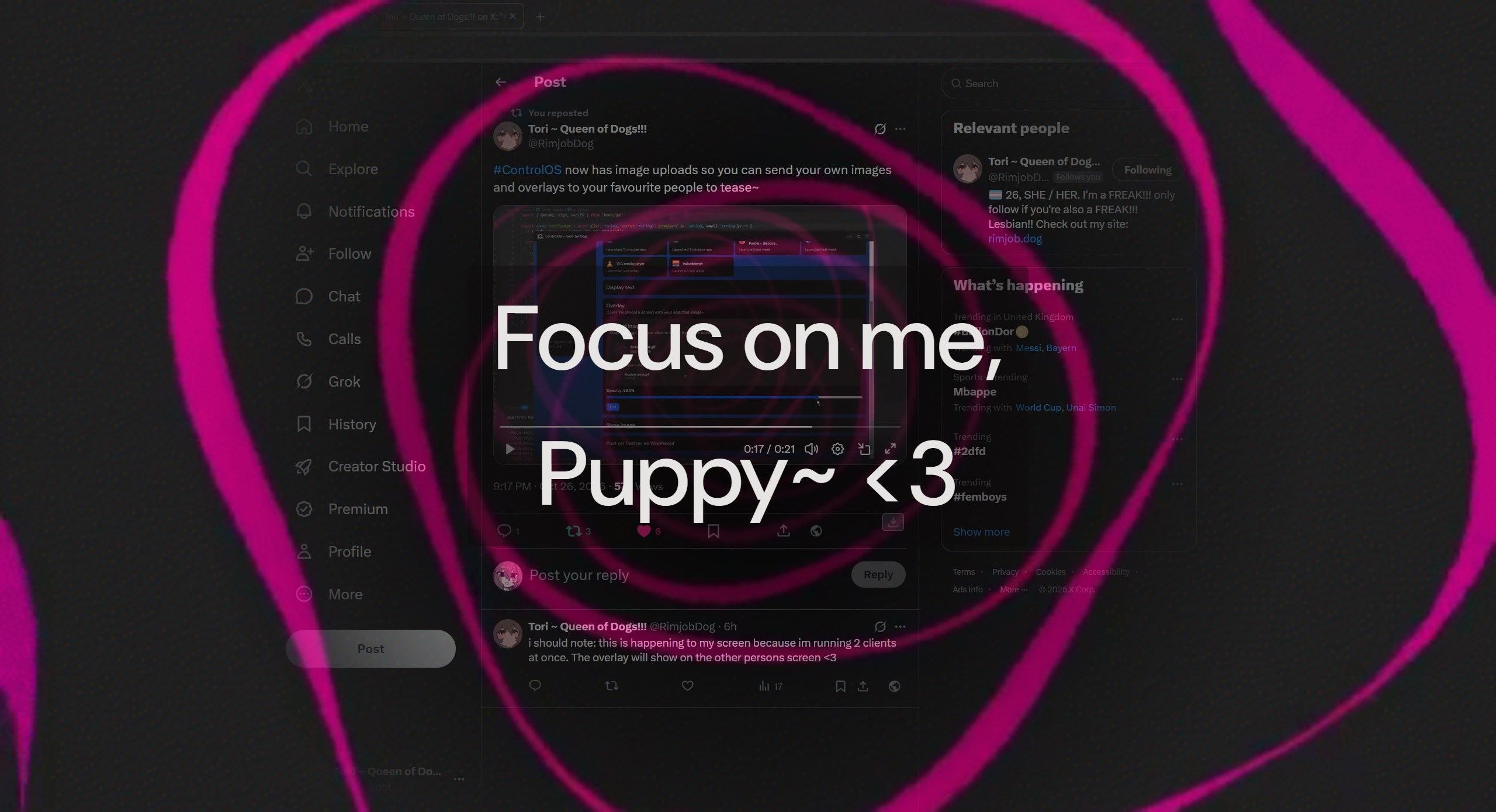
Text, images & overlays.
Show a message, an image, or an overlay on their screen for a set number of seconds.
Always in control.
You decide who does what, without worries or risk~
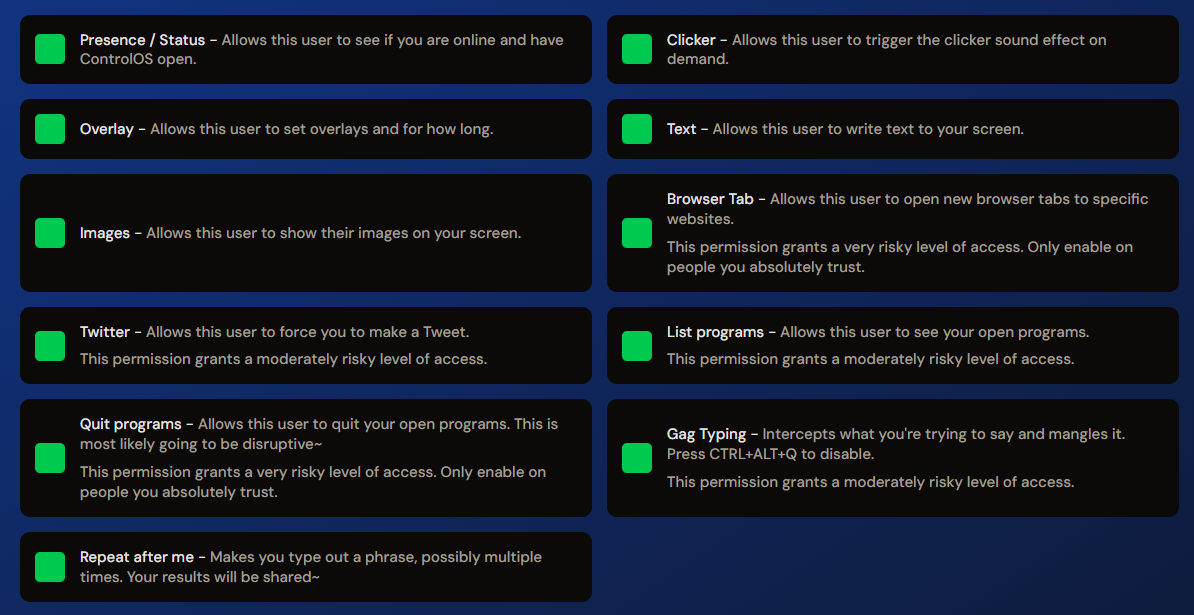
Permissions
Turn toys on or off for each friend separately. Some toys need another one first, for example a friend needs Presence before they can see your programs. Revoking takes effect straight away.
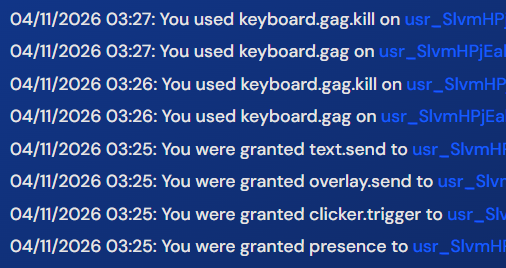
Activity log
The Safety page lists permission changes with the date and time. Click an entry to see its details.
Settings
Press CTRL + ALT + Q to stop the keyboard gag. You can also set sound volume, turn notifications off, and choose which monitor effects appear on.
How it works.
1
Add a friend
Send a friend request from the Friends page.
2
Pick their toys
Choose which permissions they get.
3
They open your control panel
They can use the toys you gave them and nothing else.
Running programs
If a friend allows it, you can see which programs they have open and when each was launched.

Discord
Launched 5 minutes ago

Firefox
Launched 25 minutes ago

League of Legends
Launched 20 minutes ago
FAQ.
What is ControlOS?
ControlOS is a desktop app for playing with friends through opt-in toys and permissions. This is not a remote-desktop tool, it can interact with your computer in specific ways without full access.
Who can control my computer?
Only friends you approve, and only the toys you enable for them.
How do I stop a toy?
ControlOS has a built in panic button: CTRL + ALT + Q. This keyboard combo will stop all toys immediately. You can use it anytime whenever you feel overwhelmed or unsafe, the other user will not be notified. Permissions can be used to selectively enable or disable toys for specific people, so make sure you grant them to someone you feel safe and comfortable with.
Which platforms are supported?
ControlOS is currently available for Windows. Linux support is planned but is complex due to me not running Linux full time. I dont have the experience needed to make a full app and fix all of the potential bugs with a different platform at this current time. My bandwidth is already limited with Windows support for now.
Is it true that ControlOS was not developed with AI?
Yes! No part of ControlOS's code was developed with or assisted by AI. Everything is hand made (which is why theres some quicks @W@), however I am working day and night to improve the app.
Will you make a streamer version for people to play with their favorite streamers~?
This is planned but is currently lower on the priority list. I want to make sure the app itself functions well. A dedicated streamer mode, with safe mode controls, is planned and will be released before the end of the year~
How intrusive is ControlOS?
ControlOS only interacts with your computer in specific ways. It does not read any of your files while running, doesnt create, delete, or modify anything in the system registar, and cleans itself up when uninstalled. The only semi-intrusive parts is the keyboard gag toy which uses AutoHotKey to mangle your inputs, but you can see the script it uses under bin/resources in the install folder. Other toys are done via fancy browser windows thanks to Electron.
How can I be sure ControlOS is safe?
Tori, the engineer behind ControlOS, has worked for 10 years in security and software development. Tori can always be reached via Discord @ toridev or via email: tori@tori.dog.
"I wanted to do something like this with someone, but felt unsafe using any of the existing tools. So instead, I made ControlOS to allow me to do fun things with others without the worry of infecting myself. I created the change I wanted to see in the world!"
In terms of the actual software, you can review the VirusTotal results here: https://www.virustotal.com/gui/url/a67280e90bf4277a26d0a9c0aca58e75612d958bb6e896c5fb9e028030da5a19?nocache=1